One Markdown File Instead of a Todo App, Spreadsheet, and Scattered Notes
1. One file as my working surface#
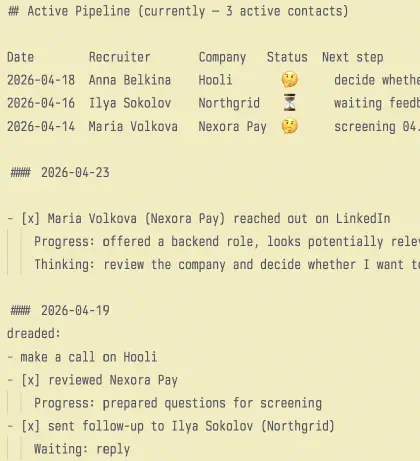
I do not have one “perfect” productivity app. Instead, I have one growing markdown file that is almost always open in my editor. It holds my current job search pipeline, a daily log, several active project tracks, and a quick inbox for things I do not want to lose. In my current one-page file, it is already structured this way: Active Pipeline at the top, a quick dump of incoming items right below it, and then daily entries with Progress, Waiting, Win, and movement across different areas.
I do not want to start this article with philosophy or methodology. It is easier to show the mechanics through a real-life scenario: a recruiter messages me, I reflect that somewhere in my system, then I reply, then there is a screening call, and after that the process either moves forward or dies. Once you see that flow, it becomes much clearer why the system needs a top pipeline, a daily log, and why this works better for me than a spreadsheet or a task manager.
2. A recruiter reached out: how I capture it#
Let’s take a common situation: an HR person messages me on LinkedIn or Telegram and suggests a call. If the contact looks at least potentially real, I try to reflect it in two places right away.
First, in Active Pipeline at the top of the file. This is not an archive or a full database. It is a short operational snapshot of what is alive right now: who is in the pipeline, where the contact came from, what state the process is in, and what the next step is. That is exactly how the top of the file works in my one-page setup: the active pipeline is its own block and only answers for the current state.
For example, it might look like this:
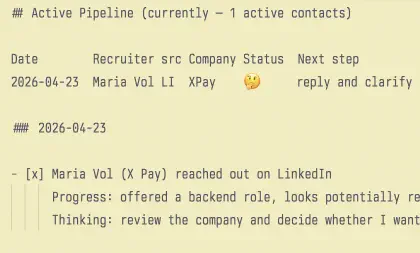
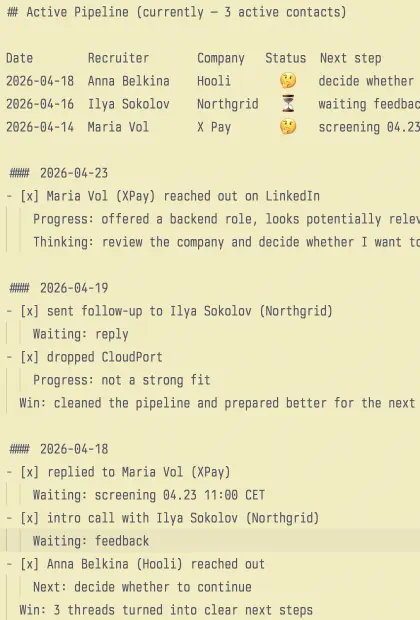
## Active Pipeline (currently — 1 active contacts)

Date Recruiter src Company Status  Next step
2026-04-23 Maria Volkova LI Nexora Pay 🤔 reply and clarify details
After that, I add the same event to the current day’s section. Not as a pipeline row this time, but as a daily log entry:
#### 2026-04-23

- [x] Maria Volkova (Nexora Pay) reached out on LinkedIn
    Progress: offered a backend role, looks potentially relevant
    Thinking: review the company and decide whether I want to reply
It matters to me that the same event lives in two forms. The top row is for overview: I open the file and in a few seconds I can see what is active right now. The entry below is for context: what exactly happened, how I assessed it, and why the process is in that state. In the real file this is exactly how it works: the active layer stays short, while the history and nuances live below in the daily entries.
3. I replied and booked a screening#
The next step is that I decide the contact is interesting, reply to the recruiter, and agree on a call. At that point the system updates in two places again.
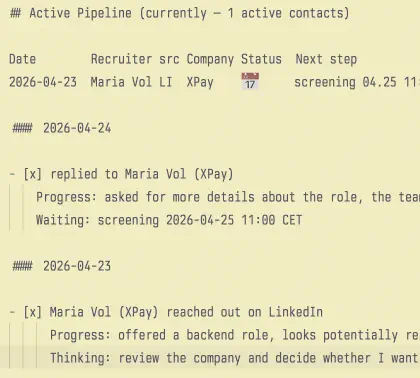
The log gets the action itself and the new next step:
#### 2026-04-23

- [x] replied to Maria Volkova (Nexora Pay)
    Progress: asked for more details about the role, the team, and the process
    Waiting: screening 2026-04-25 11:00 CET
And in Active Pipeline, the row changes from a vague 🤔 into a concrete 📅:
Date		Recruiter		src Company		Status  Next step
2026-04-23	Maria Volkova	LI	Nexora Pay    📅	screening 04.25 11:00 CET
What I like here is that a vague incoming thread stops being “something I should not forget” and turns into a manageable process with a clear next step. This is one of the main ideas behind the whole system: I try to turn fuzzy threads into explicit states as quickly as possible — Thinking, Waiting, Next, a specific date, a follow-up.
This is also where markdown starts beating a spreadsheet for me. I do not need to stop and think about which of twelve columns to update. I just edit one line at the top and add a couple of lines below.
4. The screening happened: now I am waiting for the result#
After a screening call, I want to record not only that the call happened, but also what it meant. What we discussed, what risks I noticed, what was promised next, and what I am waiting for now.
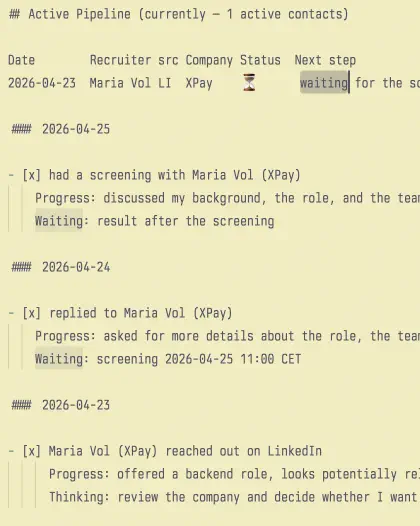
Usually a short daily log entry is enough:
#### 2026-04-25

- [x] had a screening with Maria Volkova (Nexora Pay)
    Progress: discussed my background, the role, and the team
    Waiting: result after the screening
And one edit in the top pipeline:
Date		Recruiter		src Company		Status 	Next step
2026-04-23	Maria Volkova	LI	Nexora Pay	⏳		waiting for the screening result
It is a very small action, but this is exactly what makes the system useful. If I leave a screening as just a memory of “we talked somewhere,” everything starts to blur after a few days. But when I have a short Progress and a short Waiting, it becomes clear what actually happened and what is currently outside my control.
At this point the reader should already see the main idea: the file is not just there to “remember tasks.” It is there to keep the current state and the history of state changes in one place. In the next section I would show two more quick scenarios: a positive reply that moves the process to the next stage, and the other side of the system — rejection, follow-up, or an intentional decision to leave the process.
5. A positive reply came in: the process moves forward#
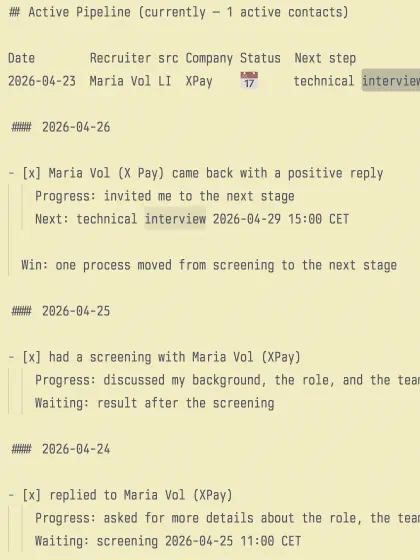
When a positive reply comes after a screening, I update both parts of the system again: the history below and the current state above.
In the log, it might look like this:
#### 2026-04-26

- [x] Maria Volkova (Nexora Pay) came back with a positive reply
    Progress: invited me to the next stage
    Next: technical interview 2026-04-29 15:00 CET

- Win: one process moved from screening to the next stage
And the row in Active Pipeline becomes more specific:
Date		Recruiter		src Company		Status  Next step
2026-04-23	Maria Volkova	LI	Nexora Pay	📅		technical interview 04.29 15:00 CET
What I like here is that the system does not just store the fact that “they invited me further.” It immediately turns that into a clear next point. That is another important part of the mechanics: I try to record not just events, but state changes. Not “there was some conversation,” but “after screening, the next stage appeared,” “now I am waiting for a slot,” “this is the next date.”
In my real one-page file, this happens all the time: after an interview, Next appears; after feedback, the top row changes; and Win sometimes helps me see that the day was not only about waiting, but also about progress.
6. Rejection, ghosting, and my own decision to exit a process#
The system is not only there to make successful processes look tidy. It is just as important that it helps me clean the pipeline and stop dragging dead branches with me.
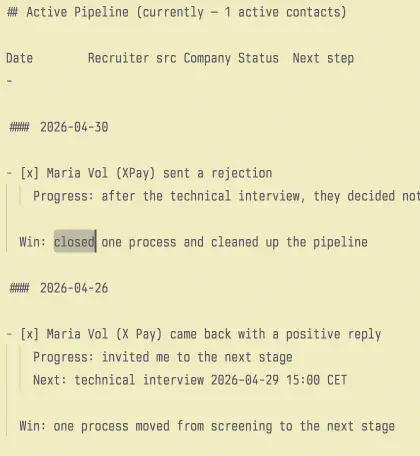
If a rejection comes in, I record it in the daily log and simply remove the row from Active Pipeline:
#### 2026-04-30

- [x] Maria Volkova (Nexora Pay) sent a rejection
    Progress: after the technical interview, they decided not to move forward

- Win: closed one process and cleaned up the pipeline
If a process stalls, I can explicitly turn passive waiting into an action:
#### 2026-05-02

- [x] sent a follow-up to Ilya Sokolov (Northgrid)
    Progress: reminded him about me after the interview
    Waiting: recruiter’s reply
And sometimes the most useful thing is to leave the process myself:
#### 2026-05-03

- [x] decided not to continue with Anna Belkina (CloudPort)
    Progress: the role does not resonate with me in terms of domain and motivation
This is an important point. The top pipeline should not turn into a graveyard of contacts I “might want to remember someday.” It is there for live processes. Everything else stays in the history below.
7. What the system consists of after these examples#
After these examples, the mechanics can be reduced to a few simple layers.
The first layer is Active Pipeline at the top of the file. It answers one question: what is active right now? It contains only the live pipeline, only the current state, and only the next step.
The second layer is the daily log. It answers a different question: what happened, and how did I get here? That is where Progress, Waiting, Next, Thinking, rejection, follow-up, interviews, new contacts, and everything else show up. In the real file this is the main body of the system.
The third layer is a quick inbox at the very top, next to the pipeline. That is where raw incoming material goes: links, thoughts, small “don’t forget” notes, things from reading, possible future moves. It is not a polished knowledge base, but a temporary dump in the most visible place.
And the fourth layer is a set of longer project lines further down: interview prep, system design, Go practice, AWS, articles, a pet project, and other directions. They do not live in a separate app — they live in the same file, just lower down and at a different scale.
If I had to summarize it very briefly, the system answers three questions at once:
- what is active right now;
- what happened today;
- what important directions am I moving overall.
8. Why this worked better for me than a spreadsheet#
A spreadsheet feels like the natural tool for job search right up until the moment you start maintaining it every day.
At first, you only want to add the date, company, recruiter, and status. Then you want the source, domain, salary range, score, notes, follow-up date, stage, stage result, final status, and several more columns on top of that. Formally, this looks “more correct,” but in real life it starts pushing back. Every new event turns into a mini form to fill in.
What worked for me instead was to keep only a compact operational pipeline at the top and put the rich context below in the log. That way I do not lose either the overview or the history, but I also do not kill the habit by maintaining a heavy structure.
To me, there is a more general principle here: in a personal system, ease of writing matters more than a perfect data model. If updating the system feels unpleasant, you first start doing it less often, then partially, and then you abandon it. My markdown file survived because it is easy to write into in almost any state.
That fits well with how the one-page file works now: the top block is short and operational, while the details, thoughts, and state transitions live below. That structure alone already shows why plain text turned out to be more durable for me than a large spreadsheet.
9. Why this worked better for me than doing everything in a task manager#
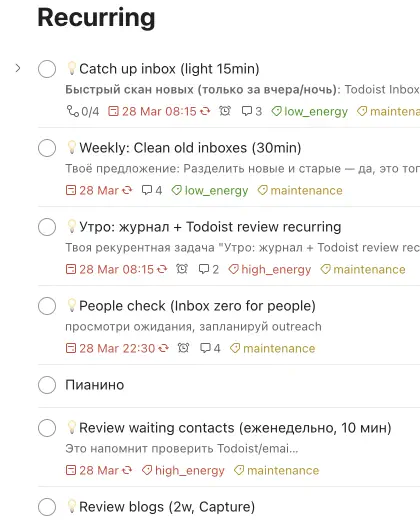
My task manager did not disappear completely, but it stopped being the main place where the system lives. I tried putting recurring tasks, inbox, projects, and next steps there, and it is still useful for that. But it never became the main working surface.
The reason is simple: in a task manager, a task usually lives as a separate object, while I care more about context. I need to see not only “reply to the recruiter” or “read a chapter,” but also the history of the process, the neighboring movements, what I am waiting for, what I already did, and which other tracks are alive next to it. In a markdown file, that context lives naturally. In a task manager, it quickly gets spread across projects, comments, labels, and filters.
So what I ended up with is this: the markdown file is the operating surface, and the task manager is a supporting layer. It is useful for recurring tasks, task inbox, and, if I want, a few immediate next steps. But the main context still stays in the file. In the grok discussion, Todoist gradually crystallized into the same role: recurring, inbox, reminders — yes; the main living context — probably not.
10. Several active tracks and why I work with Pomodoro#
There is another thing this file supports very well: I rarely want to live inside one big project. It works better for me to move several important directions in small increments than to get stuck for a whole day in one task and lose the rest of the lines.
That is why I usually have several active tracks at the same time: system design, Go practical tasks, theory flashcards, a pet project, an AWS course, job search, articles, and something else. In my one-page file this is very obvious: next to job search there are tasks go practical, go-fast-interview, AWS, system design, articles, take-home assignments, and other lines.
Pomodoro fits well here as a unit of progress. It is easier for me to do three or four 30-minute sessions in different topics than to try to “finish” one big front. That also explains an important feature of the system: an unfinished task from the previous evening should not automatically become the main task of the new morning. For me that is often not a sign of consistency, but a sign that I got stuck.
The daily log handles this rhythm well because it does not force me to think of projects as monoliths. It is excellent for short increments: “solved one task,” “did one piece of system design,” “finished part of the course,” “found several vacancies.” In that sense, the file helps me not so much to “close tasks” as to stay in contact with several important directions at once.
11. dreaded and Win#
There are two more layers that I like, but I try not to make them mandatory.
The first is dreaded. Sometimes in the morning I write down important and unpleasant tasks I am resisting. That helps me see not just a list of tasks, but the ones I am most likely to avoid. In the one-page file this layer already exists: next to ordinary entries, Dreaded blocks appear from time to time, and they often contain high-energy things like Go practice, resume work, system design, or replies to incoming messages.
The second is Win. It is there so that the system holds not only waiting states, loose ends, and unfinished processes, but also evidence of movement. Sometimes it is something very small: “a pleasant message from a recruiter,” “+1 contact in the pipeline,” “cleaned up stuck processes.” Sometimes it is bigger: moved to the next stage, finished a take-home, or completed an important chunk of work. These entries already exist in my one-page file and show well how Win helps me not see the day only through what is unfinished.
But I do not want either dreaded or Win to become a rigid ritual. They are useful precisely because they stay light. If I have the energy and the reason, great. If not, the system still keeps going through the log and the top pipeline.
12. Future analytics: this file is a bit like an event log#
If I look at the system as an engineer, I like one analogy. My daily log works a bit like an event log: at the bottom I record events — a new contact came in, I replied, a screening was scheduled, I am waiting for feedback, I sent a follow-up, I got rejected, I exited the process myself. And Active Pipeline at the top is the current projection of what is still alive.
Even now, this structure is enough to extract simple analytics. In the one-page file there are already early signs of that in the form of a weekly funnel summary and a pipeline size counter. And if I want, I can later turn the same entries into a wider table: first contact date, HR, company, source, stage dates, interview results, final status, stage duration, conversion rates.
What I like is that the system does not force this on me. It does not require me to build a giant “sick” table with every possible field from day one. First there is a light event log that I actually want to use every day. Only later, if I need it, I can build a more formal projection for analytics from it.
13. Paper as a thinking layer, digital as an operating layer#

There is also a paper layer in this system, but it is not the main one. Paper works better for me for live thinking: a daily brain dump, ideas, notes from reading, quick sketches, emotionally colored entries. It is easier to give a note some character there, highlight something with color, draw something, and generally think more freely.
But the operating layer — the active pipeline, the history of changes, the next step, everything I may need to find later through search — lives in markdown. I am not trying to make paper and digital the same. They serve different roles: paper helps me think, digital helps me not lose things and manage them.
That balance matters to me. I do not duplicate the whole day in two places. Only the things that need memory, searchability, a next step, or later action move into digital.
14. What makes this file useful in the end#
I think the strength of this system does not come from any single trick, but from the combination of a few simple things.
First, the file is always there. I do not need to consciously open it, wait for it to load, or go looking for the right table. It is already in my workspace, so the cost of entering the system is almost zero.
Second, it keeps together things that usually get split across tools: the current pipeline, the history of actions, the quick inbox, project tracks, and short increments inside them.
Third, it fits the way I actually work. I do not want to live inside one big project. I prefer to move several directions in small sessions, and the log handles that well: today I advanced one, tomorrow another, but no important line disappears for a month.
And finally, the system does not require perfect discipline. Even on a weak day, I can just record the fact that something happened. Even if I forget about Win, the log still lives. Even if I do not write dreaded, I still have the history and the current pipeline. That is why the system does not only look nice in theory, but actually survives ordinary life.
15. Conclusion#
I did not design this system as a methodology. It emerged from what actually stuck: one always-open markdown file, a short active pipeline at the top, a daily log below, a minimal language of states like Progress / Waiting / Next / Thinking, and the ability to move several important directions in small increments.
My main conclusion is probably this: it is better to optimize a personal productivity system for survivability than for perfect structure. If a tool adds too much friction, the habit dies. If it is easy to enter the system and easy to leave a trace in it, it starts working for you every day.
References#
- Jeff Huang — My productivity app is a never-ending .txt file https://jeffhuang.com/productivity_text_file/
- Fernando Borretti — Notes on Managing ADHD https://borretti.me/article/notes-on-managing-adhd